
复制安装命令
用 Codex 或 Claude 安装复制这段 Prompt,粘贴到 Codex、Claude 或其他助手里,让它先审查 Skill 页面再帮你安装。
复制前请先查看来源、License 和安全提示。
Open catalog of web skills for AI agents.
用 Codex 或 Claude 安装复制这段 Prompt,粘贴到 Codex、Claude 或其他助手里,让它先审查 Skill 页面再帮你安装。
复制前请先查看来源、License 和安全提示。
来源文件:README.md
Open catalog of web skills for AI agents.




bmem is a thin, consume-only CLI (Node, no browser) for an open catalog of reusable,
battle-tested web skills. It searches the catalog and registers skills into your agent's
native skill framework — then your agent runs them with whatever browser it already
has (Playwright MCP, claude-in-chrome, Puppeteer, …). It never drives a browser and
never sees your cookies: the agent runs the skill with its own browser, so the session
stays put.
Install the CLI, bootstrap your agent once with bmem install, then add any skill from
the catalog — it shows up in your agent's native skill list and runs with its own browser.
npm i -g bmem-cli
bmem install
bmem add linkedin.com/get-profile   # one skill
bmem add linkedin                   # every linkedin.com skill at once
Requires Node.js 20 or newer, with npx available.
| Command | What it does |
|---|---|
bmem search <query> | Search the catalog. --site linkedin.com to filter by site |
bmem list | List the whole catalog. --limit 50 to cap results |
bmem show <skill> | Print a skill's SKILL.md without installing it |
bmem add <skill> | Download + register a skill natively. Global by default; --no-global for project scope |
bmem add <site> | A bare site (linkedin, doordash.com) adds every skill the site has, one by one |
bmem update [skill] | Re-fetch installed skills and re-register the ones that changed. Omit the name to update all |
bmem install | Register the bundled meta-skill that teaches your agent the commands and how to map skill capabilities to its own browser tools |











| Env var | Default | Purpose |
|---|---|---|
BMEM_SKILLS_API_BASE_URL | https://api.browser-memory.com | Skills API base (self-host) |
BMEM_HOME | ~/.config/bmem | Local cache of added skills |
MIT
name: bmem
description: Drive the bmem CLI to find, add, and run reusable web skills with whatever browser you already have (Playwright, claude-in-chrome, etc.).bmem is an open catalog of web skills — reusable, battle-tested recipes for
operating specific sites (search LinkedIn, read a Reddit thread, …). A skill ships
the exact selectors and, when possible, the direct in-page XHR, so you don't have to
read a whole DOM to figure the site out. You run the skill with your own browser;
bmem never drives a browser and never sees your cookies.
Use this loop whenever a task involves operating a website.
Search first. Before exploring a site by hand, look for a skill:
bmem search <query>              # e.g. bmem search linkedin people
bmem search --site linkedin.com  # filter by site
bmem list --limit 50             # browse the whole catalog
Results are tiny index entries: name, intent, side_effect, needs, verified.
Want the full recipe before committing? Read it without installing:
bmem show linkedin.com/search-people # prints the SKILL.md, no install
Add the skill. If one fits, register it as a native skill:
bmem add linkedin.com/search-people   # one skill
bmem add linkedin                     # a bare site adds every skill it has
After this the skill appears in your own skill list — invoke it natively.
You do NOT call bmem again to read it.
Never invent a skill id. Only
addanamethat came back verbatim fromsearchorlist. The catalog is curated and read-only — a made-up id likelinkedin.com/find-jobswill just 404. If nothing matches, go to step 4.
Run it with your browser (see Execution below).
No skill found? bmem search is empty → explore the site yourself, find the
real XHR endpoint in the network log (more robust than clicking), and author a new
SKILL.md. Authoring is out-of-band — see the project's authoring guide.
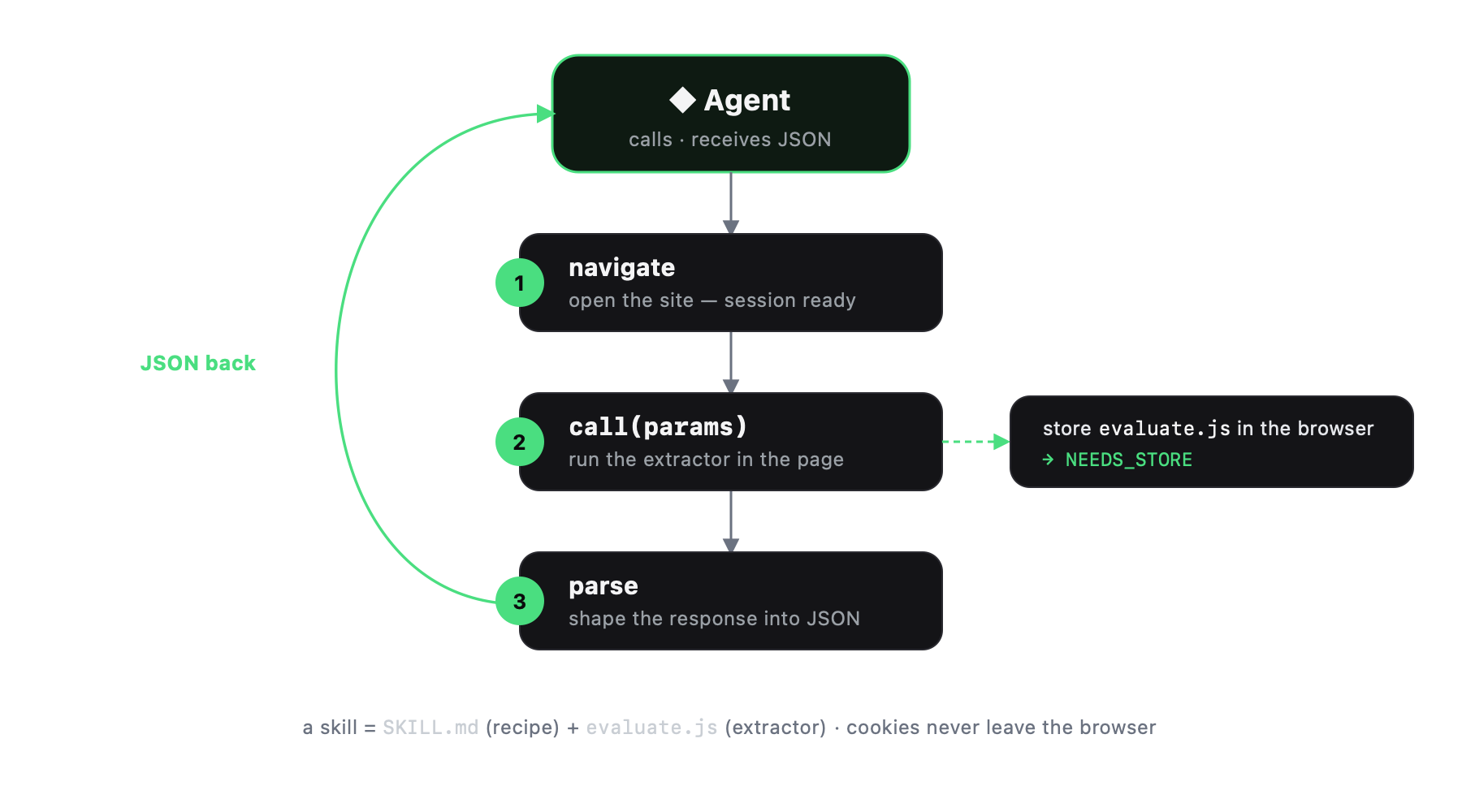
A skill declares the browser capabilities it needs (needs: [navigate, evaluate])
and writes its ## Execute steps in those generic verbs. It never names a concrete
tool — you map each capability to whatever browser you have.
needs: [evaluate] (± navigate) — the robust case: one in-page fetch + parse.needs includes click/type/snapshot — UI-driven, more fragile. Requires a
browser that can drive the rendered page.Check needs up front: if your browser can't provide a capability, switch to one that can.
Translate each capability verb to your browser's tool:
| Capability | Playwright MCP | claude-in-chrome | browser-memory bm_* |
|---|---|---|---|
navigate(url) | browser_navigate | navigate | bm_navigate |
evaluate(fn) | browser_evaluate | javascript_tool | (in-page eval) |
snapshot() | browser_snapshot | read_page | bm_snapshot |
click(ref) | browser_click | computer | bm_click |
type(ref,t) | browser_type | form_input | bm_type |
network() | browser_network_requests | read_network_requests | bm_network |
Skills ship a CSS selector / description, never an ephemeral ref or coordinate —
resolve it at runtime. Prefer doing DOM actions inside evaluate
(document.querySelector(sel).click(), scrollIntoView()) — it's uniform across
every browser and beats native click/type.
One path, browser-agnostic:
navigate to the URL in the skill's Execute step 1 (establishes the session /
same-origin for the fetch).evaluate the skill's ## Extractor function with the skill's params. It does the
in-page authenticated fetches and parsing, and returns the JSON described in returns.## Success assertion.The browser holds the session — no cookies ever leave it.
auth: session)Some skills need a logged-in session. Check the skill's ## Preconditions:
navigate to the site, let the user log in manually, then retry. The
session persists in the browser profile; don't try to automate the login.Point the CLI at another catalog with BMEM_SKILLS_API_BASE_URL. No config command needed.
评论 (0)
暂无评论,成为第一个评论者吧!