
复制安装命令
用 Codex 或 Claude 安装复制这段 Prompt,粘贴到 Codex、Claude 或其他助手里,让它先审查 Skill 页面再帮你安装。
复制前请先查看来源、License 和安全提示。
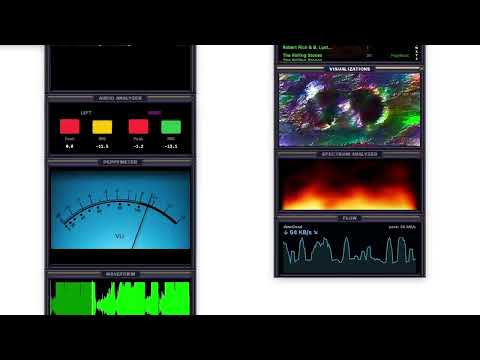
MixCollage-12-Mar-2026-03-38-PM-191
用 Codex 或 Claude 安装复制这段 Prompt,粘贴到 Codex、Claude 或其他助手里,让它先审查 Skill 页面再帮你安装。
复制前请先查看来源、License 和安全提示。
来源文件:README.md
yt-dlp + ffmpeg, see Requirements), with metadata tags, embedded cover art, metadata-based filenames, and a .cue sheet generated from chapter timestampsyt-dlp + ffmpeg, see Requirements); downloads play locally and cast like any track.cue sheet support — open a .cue (or an audio file with a sibling .cue) to virtually split one backing file into per-track, gapless playlist rows; an optional library setting (off by default, needs ffmpeg) physically splits cue albums on import into per-track FLACs, organized into a per-album folder named from the source's metadataDownload the latest DMG:
https://github.com/ad-repo/nullplayer/releases/latest/download/NullPlayer.dmg
Requires macOS 14 Sonoma or newer.
NullPlayer is not signed with an Apple Developer ID — that requires a paid Apple developer account, which this project does not have and has no plans to buy. Because of that, macOS Gatekeeper will block the app on first launch with an "app is damaged" or "cannot verify that it is free from malware" message. This is expected, not a sign anything is wrong. Clearing the quarantine flag is a required install step — run it every time you install or update via the DMG:
Open NullPlayer.dmg.
Drag NullPlayer.app to Applications.
Clear the quarantine flag so macOS will open the app. Open Terminal (Cmd + Space, type Terminal, press Return) and run:
xattr -cr /Applications/NullPlayer.app
Open NullPlayer from Applications.
See docs/download.md for the same install steps in a short download-only page.
Tip: Don't want to run a Terminal command every time you update? Install with Homebrew (next section) instead — the cask clears the quarantine flag for you automatically, so the app just opens.
Homebrew is a free package manager for macOS. This is the smoothest way to install NullPlayer: Homebrew removes the Gatekeeper quarantine flag automatically, so you never see the "app is damaged" warning, and updates are a single command.
New to Homebrew? Here's the whole thing, start to finish:
Open Terminal — press Cmd + Space, type Terminal, and press Return.
Install Homebrew by pasting this line and pressing Return. It asks for your Mac login password (the cursor stays still while you type — that's normal) and takes a few minutes:
/bin/bash -c "$(curl -fsSL https://raw.githubusercontent.com/Homebrew/install/HEAD/install.sh)"
Already have Homebrew? Skip this step.
Add Homebrew to your shell so the brew command is found. The installer finishes by printing a Next steps section — run the two commands it lists. On Apple Silicon Macs (M1/M2/M3/M4) they are:
echo 'eval "$(/opt/homebrew/bin/brew shellenv)"' >> ~/.zprofile
eval "$(/opt/homebrew/bin/brew shellenv)"
On older Intel Macs, replace /opt/homebrew with /usr/local. If brew already worked before you started, skip this step.
Add the NullPlayer tap (one-time configuration):
brew tap ad-repo/nullplayer
Install NullPlayer:
brew install --cask ad-repo/nullplayer/nullplayer
Open NullPlayer from your Applications folder or Launchpad — no security prompt.
Updating to a new release:
brew update
brew upgrade --cask ad-repo/nullplayer/nullplayer
Verify the tap is serving the latest version:
brew livecheck --cask ad-repo/nullplayer/nullplayer
brew uninstall --cask --zap nullplayer removes app data under ~/Library/Application Support/NullPlayer and the app's preferences/caches, but does not remove Keychain entries for Plex/Subsonic/Jellyfin/Emby tokens. To clear those:
security delete-generic-password -s com.nullplayer.app
If you'd rather not run the xattr command in step 3 above, you can clear the block through System Settings instead:
NullPlayer.app to Applications and double-click it once. macOS will refuse to open it — that's expected.After this NullPlayer opens normally. (Installing with Homebrew avoids this entirely — the cask clears the flag for you.)
If you want to use NullPlayer as a scriptable command in terminal workflows or automation pipelines, the DMG includes:
nullplayer — launcher wrapperInstall NullPlayer CLI.command — one-click installer for /usr/local/bin/nullplayerInstall flow:
bash "/Volumes/NullPlayer/Install NullPlayer CLI.command"
nullplayer --cli --help
The launcher looks for:
/Applications/NullPlayer.app~/Applications/NullPlayer.appThe YouTube source and Stream Ripper features download and transcode media by shelling out to two command-line tools that are not bundled — install them via Homebrew:
brew install yt-dlp ffmpeg
Postprocessing: ffmpeg not found and audio downloads can't be converted.NullPlayer looks for both in the standard Homebrew/MacPorts locations (/opt/homebrew/bin, /usr/local/bin, /opt/local/bin, /usr/bin). Keep them current with brew upgrade yt-dlp ffmpeg — an outdated yt-dlp may fail to list or download videos as YouTube changes.
Requires Xcode 15.0+ with Command Line Tools and Swift 5.9+.
# Clone the repository
git clone https://github.com/ad-repo/nullplayer.git
cd nullplayer

# Download required frameworks
./scripts/bootstrap.sh

# Build and run
./scripts/kill_build_run.sh
The bootstrap script downloads VLCKit and libprojectM from GitHub Releases with checksum verification.
To open in Xcode:
open Package.swift
| Library | Purpose |
|---|---|
| ZIPFoundation | .wsz skin file extraction |
| SQLite.swift | Media library storage |
| AudioStreaming | HTTP audio streaming for Plex |
| FlyingFox | Embedded HTTP server for local file casting |
| libprojectM | ProjectM visualizations |
Library data is stored as a SQLite database at ~/Library/Application Support/NullPlayer/library.db.
Backup & Restore API (MediaLibrary.swift):
| Function | Description |
|---|---|
backupLibrary(customName:) | Creates timestamped .db backup, returns URL |
restoreLibrary(from:) | Restores from backup (auto-backs up current first) |
listBackups() | Returns backup URLs sorted newest first |
deleteBackup(at:) | Deletes a backup file |
Backups are stored in ~/Library/Application Support/NullPlayer/Backups/.
NullPlayer includes a first-class headless CLI mode for browsing, querying, playing, and routing media entirely from the terminal. It is designed to work as a scriptable command in automation pipelines: resolve media from multiple sources, pick a local output or cast target, then hand off playback without opening the GUI.
This is not just a hidden debug flag. nullplayer is a supported command surface for:
--jsonnullplayer --cli [OPTIONS]
nullplayer can act as a scriptable media control command for automation pipelines, connecting multiple media sources to multiple playback targets.
Supported media sources include:
Supported playback targets include:
Typical automation shape:
nullplayer --cli --source plex --playlist "All Music" --cast "Living Room" --cast-type sonos
nullplayer --cli --source local --artist "Courtney Barnett" --output "MacBook Pro Speakers"
nullplayer --cli --source radio --station "Radio Paradise: Mellow Mix" --cast "Kitchen Speaker" --cast-type chromecast
nullplayer --cli --source plex --library Movies --movie "Alien: Romulus" --cast "Living Room TV" --cast-type chromecast
nullplayer --cli --file "/path/to/video.mkv" --cast "Samsung QN90BA 75" --cast-type dlna
Audio and video scope. Music playback supports local output, Sonos, Chromecast, and DLNA targets. Video is cast-only in CLI mode: use
--filefor local video files or--movie/--show/--episodefor Plex, Jellyfin, and Emby video libraries. Video requires--castand supports Chromecast or DLNA TV targets; Sonos is audio-only.
nullplayer --cli --list-sources                                        # show configured sources
nullplayer --cli --list-libraries --source plex                        # list Plex libraries
nullplayer --cli --list-artists   --source plex --library AD-FLAC      # list artists in a Plex library
nullplayer --cli --list-albums    --source plex --library AD-FLAC --artist "Soundgarden"
nullplayer --cli --list-albums    --source local                       # list local albums
nullplayer --cli --list-tracks    --source local --artist "Rush"       # list tracks
nullplayer --cli --list-genres    --source local                       # list local genres
nullplayer --cli --list-artists   --source subsonic                    # Navidrome/Subsonic artists
nullplayer --cli --list-albums    --source jellyfin --artist "3rd Bass" # Jellyfin albums by artist
nullplayer --cli --list-libraries --source emby                        # Emby libraries
nullplayer --cli --list-playlists --source plex                        # list playlists
nullplayer --cli --list-stations                                       # list internet radio stations
nullplayer --cli --list-eq                                             # list EQ presets
nullplayer --cli --list-outputs                                        # list audio output devices
nullplayer --cli --list-devices                                        # list cast devices
nullplayer --cli --search "soundgarden" --source plex --library AD-FLAC  # search a library
nullplayer --cli --list-artists   --source plex --library AD-FLAC --json # JSON output
Selecting a Plex library. Plex servers often expose several music libraries (e.g.
AD-FLAC,AD-MP3,Classical-FLAC). Pass--library <name>to pick one. If you omit it, the CLI uses your last-selected music library; if that is ambiguous it prints the available music libraries so you can choose. Runnullplayer --cli --list-libraries --source plexto see the exact names.
# Local library
nullplayer --cli --source local --artist "Courtney Barnett"
nullplayer --cli --source local --album "Dub Side Of The Moon"
nullplayer --cli --source local --genre "Reggae" --repeat-all
nullplayer --cli --source local --artist "Rush" --shuffle

# Plex — pick a music library with --library (omit to use your last-selected one)
nullplayer --cli --source plex --library AD-FLAC --artist "Soundgarden" --album "SuperUnknown"
nullplayer --cli --source plex --library AD-FLAC --artist "AC/DC" --shuffle
nullplayer --cli --source plex --library AD-FLAC --artist "AC/DC" --album "Black Ice" --tuning 432
nullplayer --cli --source plex --playlist "All Music"

# Subsonic / Navidrome (music-only server; --library selects a music folder)
nullplayer --cli --source subsonic --artist "ZZ Top" --album "Eliminator"
nullplayer --cli --source subsonic --artist "ZZ Top" --shuffle

# Jellyfin (--library selects a music library; omit to use the current one)
nullplayer --cli --source jellyfin --library "Music" --artist "3rd Bass" --album "The Cactus Album"
nullplayer --cli --source jellyfin --artist "3rd Bass" --shuffle

# Emby
nullplayer --cli --source emby --library "Music" --artist "ZZ Top" --album "La Futura"
nullplayer --cli --source emby --artist "ZZ Top"

# Internet radio
nullplayer --cli --source radio --station "Radio Paradise: Mellow Mix"
nullplayer --cli --source radio --station "Heart 80s UK"

# Outputs and casting
nullplayer --cli --source local --artist "Augustus Pablo" --output "MacBook Pro Speakers"
nullplayer --cli --source plex --playlist "Recently Added" --cast "Living Room" --cast-type sonos
nullplayer --cli --source plex --library AD-FLAC --artist "Soundgarden" --album "Louder Than Love" --library AD-FLAC --cast "Dining Room" --cast-type sonos

# Sonos multi-room: the first name is the group coordinator, the rest are grouped onto it
nullplayer --cli --source plex --playlist "Recently Added" --cast "Living Room,Kitchen,Office" --cast-type sonos
# (equivalent to --cast "Living Room" --sonos-rooms "Kitchen,Office")
Video commands require --cast and route to Chromecast or DLNA TV targets. Use nullplayer --cli --list-devices to get the exact device names on your network.
Local video files are served through NullPlayer's embedded local media server on port 8765. If the main NullPlayer app is already open, it may already own that port; quit the app UI or stop the other NullPlayer process before retrying the CLI cast. Videos added with Add Video Files... stay at their original file paths; cast them from the CLI with --file.
# Local video file
nullplayer --cli --file "/path/to/video.mkv" --cast "Chromecast-Ultra-91a086b76d0c422dd9dd9cda078e4911" --cast-type chromecast
nullplayer --cli --file "/path/to/video.mkv" --cast "Samsung QN90BA 75" --cast-type dlna

# Local video file from Downloads
nullplayer --cli --file "$HOME/Downloads/My Movie.mp4" --cast "Chromecast-Ultra-91a086b76d0c422dd9dd9cda078e4911" --cast-type chromecast --verbose
nullplayer --cli --file "$HOME/Downloads/My Movie.mp4" --cast "Samsung QN90BA 75" --cast-type dlna --verbose

# Plex movies
nullplayer --cli --source plex --library Movies --movie "Alien: Romulus" --cast "Chromecast-Ultra-91a086b76d0c422dd9dd9cda078e4911" --cast-type chromecast
nullplayer --cli --source plex --library Movies --movie "Alien: Romulus" --cast "Samsung QN90BA 75" --cast-type dlna

# Plex TV episodes
nullplayer --cli --source plex --library "TV Shows" --show "Alien: Earth" --episode "Neverland" --season 1 --number 1 --cast "Chromecast-Ultra-91a086b76d0c422dd9dd9cda078e4911" --cast-type chromecast
nullplayer --cli --source plex --library "TV Shows" --show "Alien: Earth" --episode "Neverland" --season 1 --number 1 --cast "Samsung QN90BA 75" --cast-type dlna

# Emby movies
nullplayer --cli --source emby --library Movies --movie "Alien: Romulus" --cast "Chromecast-Ultra-91a086b76d0c422dd9dd9cda078e4911" --cast-type chromecast
nullplayer --cli --source emby --library Movies --movie "Alien: Romulus" --cast "Samsung QN90BA 75" --cast-type dlna

# Emby TV episodes
nullplayer --cli --source emby --library "TV shows" --show "Abbott Elementary" --episode "Ava & Fest" --season 5 --number 21 --cast "Chromecast-Ultra-91a086b76d0c422dd9dd9cda078e4911" --cast-type chromecast
nullplayer --cli --source emby --library "TV shows" --show "Abbott Elementary" --episode "Ava & Fest" --season 5 --number 21 --cast "Samsung QN90BA 75" --cast-type dlna

# Jellyfin movies and TV episodes
nullplayer --cli --source jellyfin --library "Movies" --movie "Alien: Romulus" --cast "Chromecast-Ultra-91a086b76d0c422dd9dd9cda078e4911" --cast-type chromecast
nullplayer --cli --source jellyfin --library "Movies" --movie "Alien: Romulus" --cast "Samsung QN90BA 75" --cast-type dlna
nullplayer --cli --source jellyfin --library "TV Shows" --show "Alien: Earth" --episode "Neverland" --season 1 --number 1 --cast "Chromecast-Ultra-91a086b76d0c422dd9dd9cda078e4911" --cast-type chromecast
nullplayer --cli --source jellyfin --library "TV Shows" --show "Alien: Earth" --episode "Neverland" --season 1 --number 1 --cast "Samsung QN90BA 75" --cast-type dlna
DLNA video devices do not report reliable end-of-stream status, so press q to stop the CLI when the video ends. Chromecast video exits automatically after playback ends and the cast session is torn down.
Set the initial playback volume at launch:
nullplayer --cli --source local --artist "Rush" --volume 80
nullplayer --cli --source plex --playlist "All Music" --cast "Living Room" --cast-type sonos --volume 35
During playback:
↑ increases volume by 5%↓ decreases volume by 5%m toggles muteFor audio casting, the same CLI volume control path is used for the cast target as well.
Reference Tuning pitch-shifts local output to a selected reference frequency, such as retuning A=440 content to A=432. In the app, use Playback > Options > Reference Tuning for Off, 432 Hz, 440 Hz, or custom source/target Hz. It applies to local files and HTTP streams from Plex, Subsonic/Navidrome, Jellyfin, Emby, and internet radio. It is unavailable while casting because Sonos, Chromecast, and DLNA renderers receive the media URL directly.
CLI overrides are session-only:
nullplayer --cli --source local --artist "Rush" --tuning 432
nullplayer --cli --source plex --library AD-FLAC --artist "Soundgarden" --tuning 432 --tuning-source 440
nullplayer --cli --source radio --station "Radio Paradise: Mellow Mix" --tuning-offset-cents -31.766
| Key | Action |
|---|---|
Space | Pause/Resume |
q | Quit |
> / < | Next / Previous track |
→ / ← | Seek forward / backward 10s |
↑ / ↓ | Volume up / down |
s | Toggle shuffle |
r | Cycle repeat (off → all → one) |
m | Toggle mute |
i | Show track info |
For video casting, Space pauses/resumes the cast, → / ← seek on the cast session, and q stops casting before exiting. Track navigation, shuffle, repeat, mute, and volume controls are audio-only.
During music playback the CLI shows album art in the terminal. The render mode is auto-detected from the terminal's color support and can be forced:
--color-art: force color art--ascii-art: force the monochrome character-ramp — use this if your terminal reports color but renders the art as flat blocks--no-art: disable album artnullplayer --cli --source local --artist "Rush" --ascii-art
If a terminal misreports its color support (some shell profiles export COLORTERM=truecolor globally, making every terminal claim color it can't paint), set a per-terminal default in that terminal's shell profile instead of passing a flag each time:
export NULLPLAYER_ART=ascii # or: color, auto (default). Flags still override.
Framework log output is suppressed by default so the session stays clean. Pass --verbose to keep it for debugging:
nullplayer --cli --source plex --playlist "All Music" --cast "Living Room" --cast-type sonos --verbose
See nullplayer --cli --help for the full flag reference.
See AGENTS.md for documentation links and key source files.
Note: This project will never support Spotify, Youtube, Apple or Amazon. Please do not submit PRs for this type of integration.
NullPlayer does not collect or transmit personal data to the developer. Playback and usage history is stored only in the app's local SQLite database. See the Privacy Policy for details about local storage and user-directed network features.
NullPlayer has three looks — Classic, Modern, and Metal — selectable from the right-click context menu under Skins. Switching between them happens live, with no restart — playback, casting, and the open playlist continue uninterrupted while the windows rebuild in the new look:
Classic .wsz skin support. The app starts with a native macOS appearance and ships with one original NullPlayer skin (Silver). To apply a skin, use Skins > Load Skin... to open a .wsz file, or place skin files in ~/Library/Application Support/NullPlayer/Skins/ and select them from the Skins menu. Thousands of community-created skins can be downloaded from the Skins > Get More Skins... menu link, which opens the Winamp Skin Museum.
A custom skin engine built from scratch with a neon cyberpunk aesthetic. Modern skins are JSON-configured and support:
The bundled default skin ("NeonWave") is fully programmatic -- zero image assets, pure palette-driven rendering.
Creating a skin is as simple as writing a single JSON file. See SKINNING.md for the complete guide.
Skin installation: Place skin folders or .nps bundles in ~/Library/Application Support/NullPlayer/ModernSkins/, then right-click the player and select your skin from Skins > Modern > Select Skin.
A hi-fi hardware faceplate look, selected from Skins > Metal, with seven finishes — Brushed Steel, Aluminum, Gunmetal, Anodized Black, Brass, Bronze, and Copper. Each finish restyles the whole player (chrome, panels, sliders, transport, and EQ) with a backlit-green LCD for the time and track displays and a spectrum analyzer matched to the finish.
This project is open source. Because it bundles GPL-licensed components (aubio and the PeppyMeter meter templates), the combined application is distributed under the terms of the GNU GPL v3.0 only. (The video engine is VLCKit/libVLC, which is LGPL — see below.)
The NullPlayer name, logo, icon, and other brand identifiers are not licensed for use by modified distributions. Forks, derivative works, and redistributed builds must use a different application name and replace or remove NullPlayer branding from user-facing product names, bundle names, bundle identifiers, executable names, icons, and public marketing materials unless they have prior written permission. Accurate attribution such as "based on NullPlayer" is allowed when it does not imply endorsement.
The full text of every third-party notice ships inside the app bundle at
Contents/Resources/ThirdPartyLicenses/ (aggregated in ThirdPartyNotices.txt,
with the individual license texts alongside it). scripts/build_dmg.sh runs
scripts/validate_notices.sh to fail the release if any bundled dependency is
missing its notice. See docs/third-party-notices.md
for the refresh process and scripts/third_party_components.tsv for the
authoritative component/version/license list.
Bundled third-party components:
Swift packages (compiled into the binary)
.wsz/.nps extractionBundled frameworks / dynamic libraries
Native visualization ports (compiled into the binary)
Fonts & assets
name: flow
description: Flow network throughput window — live download/upload meter, interface selection, single-height center-stack docking, classic/modern window controllers, and rendering behavior.
Flow is a dockable network throughput meter available in classic and modern UI.
https://github.com/programmersd21/flowSources/NullPlayer/Resources/ThirdPartyLicenses/flow_NOTICE.txt (flow is MIT upstream).scripts/third_party_components.tsv entry flowWindows menu or the main-window context menu as Flow.UserDefaults under NetworkMonitorDisplayDirection.NetworkThroughputMonitor.selectedInterfaceDefaultsKey.WindowManager.1.75x landscape stack height; do not reuse PeppyMeter sizing for Flow.SkinElements.SpectrumWindow.windowSize / minSize.ModernSkinElements.spectrumWindowSize / spectrumMinSize.WindowManager.| File | Purpose |
|---|---|
Utilities/NetworkThroughputMonitor.swift | Network byte counters, interface selection, history, daily totals, snapshots |
Windows/NetworkMonitor/NetworkMonitorDrawing.swift | Shared Flow content renderer and download/upload view persistence |
Windows/NetworkMonitor/NetworkMonitorView.swift | Classic chrome, hit testing, context menu, double-click direction toggle |
Windows/NetworkMonitor/NetworkMonitorWindowController.swift | Classic window lifecycle, monitor start/stop, default frame |
Windows/ModernNetworkMonitor/ModernNetworkMonitorView.swift | Modern chrome, docking masks, context menu, double-click direction toggle |
Windows/ModernNetworkMonitor/ModernNetworkMonitorWindowController.swift | Modern window lifecycle, monitor start/stop |
App/NetworkMonitorWindowProviding.swift | Classic/modern provider abstraction |
App/WindowManager.swift | Show/toggle Flow, center-stack sizing, restored-frame normalization |
NetworkMonitorRenderState smooths displayed download/upload values toward the latest snapshot.NetworkMonitorDrawing.drawContent advances both directions every frame, but draws only the selected direction.NetworkMonitorDrawing instead.NSRect.expandingThroughJoinedEdges) in every render style — not just Metal — so no ~1px seam shows on a docked edge (issue #364). The helper must not expand across a visible title bar gap; Flow's body content must never paint over the title bar or close button.setNeedsDisplay(contentAreaRect()) fast path for timer redraws; it can flicker the bottom edge when Flow is locked above another window. Timer redraws should invalidate a guarded animation rect that excludes the bottom strip, while NetworkMonitorDrawing.drawContent still receives the full content rect so graph layout remains stable. Full-window paints should draw content first and chrome/borders after it.showWindow starts the monitor and refreshes interfaces.prepareForUITeardown() calls tearDownMonitoring() through NetworkMonitorWindowProviding.centerStackHeightMultiplier(for:), applyCenterStackSizingConstraints, and normalizedCenterStackRestoredFrame.swift build.
评论 (0)
暂无评论,成为第一个评论者吧!