
复制安装命令
用 Codex 或 Claude 安装复制这段 Prompt,粘贴到 Codex、Claude 或其他助手里,让它先审查 Skill 页面再帮你安装。
复制前请先查看来源、License 和安全提示。
6,500+ SVG icons. Brands, AWS, Azure, GCP, and more. Search, copy, ship.
用 Codex 或 Claude 安装复制这段 Prompt,粘贴到 Codex、Claude 或其他助手里,让它先审查 Skill 页面再帮你安装。
复制前请先查看来源、License 和安全提示。
来源文件:README.md

6,500+ SVG icons. Brands, AWS, Azure, GCP, and more. Search, copy, ship.










Browse Icons • Install • Extensions • CDN • API • Packages • Compare • Contribute
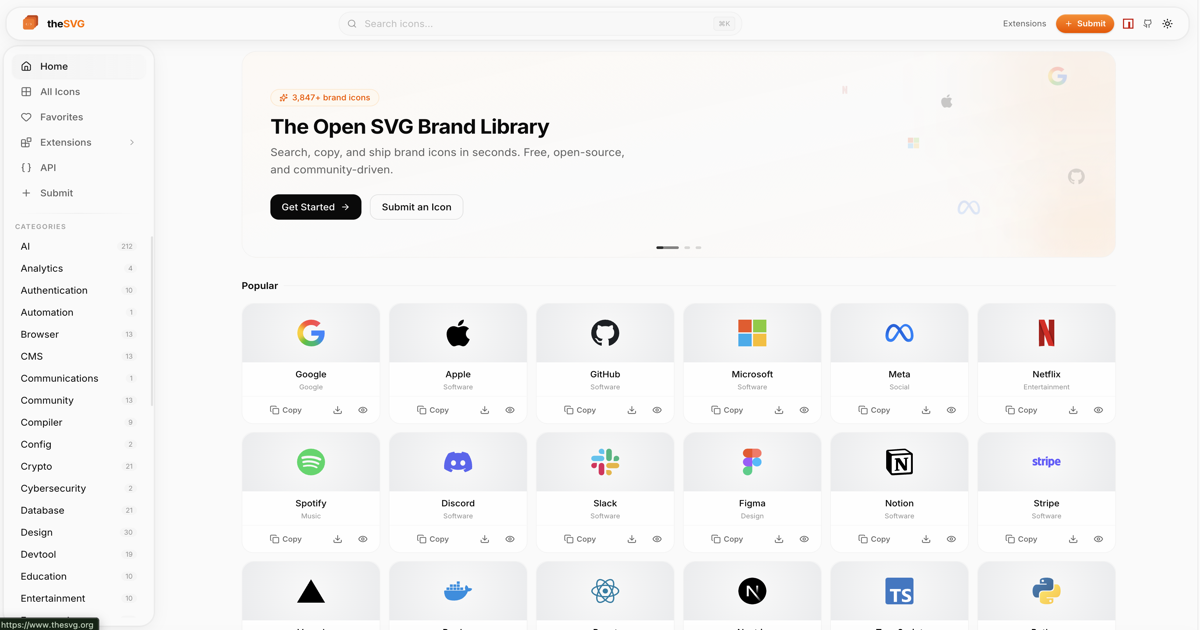
Most icon libraries focus on UI icons. Brand logos are scattered across press kits, Figma files, and random GitHub repos. theSVG is the single source for SVG icons - brand logos, cloud architecture diagrams, and more. Searchable, versioned, and available as npm packages, CDN, CLI, API, and MCP server.
theSVG organizes icons into collections:
| Collection | Icons | Description |
|---|---|---|
| Brand Icons | 4,629 | Brand logos from 140+ categories |
| AWS Architecture | 739 | Official AWS service, resource, category, and group icons (2026-Q1) |
| Azure Services | 626 | Microsoft Azure service icons (2026-Q1) |
| Google Cloud | 214 | Google Cloud Platform icons (2026-Q1) |
Browse all AWS service and resource icons at thesvg.org/collection/aws. Icons are sourced from the official AWS Architecture Icons package and distributed unmodified under CC BY-ND 2.0. Updated quarterly.
npm
npm install thesvg
Homebrew
brew tap glincker/thesvg
brew install thesvg
import github from "thesvg/github";

github.svg;        // raw SVG string
github.title;      // "GitHub"
github.hex;        // "181717"
github.variants;   // { default: "<svg...>", mono: "<svg...>" }
Or use the scoped package for tree-shaking:
npm install @thesvg/icons
| Package | Description | |
|---|---|---|
thesvg | All icons in one package |  |
@thesvg/icons | Core icon data, tree-shakeable |  |
@thesvg/react | Typed React components |  |
@thesvg/vue | Typed Vue 3 components |  |
@thesvg/svelte | Typed Svelte components |  |
@thesvg/cli | CLI tool (npx @thesvg/cli add github) |  |
@thesvg/mcp-server | MCP server for AI assistants |  |
Use theSVG icons everywhere you build, design, and ship. Browse the full ecosystem at thesvg.org/extensions.
| Extension | Status | Description |
|---|---|---|
| Figma Plugin | Published | Browse 6,500+ brand SVGs, variant picker, recents row, keyboard shortcuts. Insert as editable vectors. |
| VS Code | Published | Search 6,500+ icons from the command palette. Copy SVG, JSX, CDN link, or insert at cursor. |
| Raycast | Published | Search, preview, and copy any brand SVG in one keystroke. Filter by category, preview variants. |
| MCP Server | Published | AI tool calls for Claude, Cursor, Windsurf. Fetch icons by name or category. |
| Agent Skill | Published | Drop-in skill for AI agents. Install via npx skills add glincker/thesvg. Teaches the icon CDN and registry. |
@thesvg/cli | Published | shadcn-style installer. npx @thesvg/cli add github drops the SVG into your project. |
| Homebrew | Published | brew tap glincker/thesvg && brew install thesvg |
| CDN via jsDelivr | Published | Serve any icon via global CDN. Drop into HTML, CSS, Markdown, Notion, Webflow, Framer. |
| Iconify | Published | Brand icons available as thesvg (mono) and thesvg-color sets. Works with any Iconify-consuming tool: Mermaid architecture diagrams, Iconify's VS Code and Figma plugins, @iconify/react, and more. |
| Browser Extension | Beta | Chrome, Firefox, Edge popup with 6,500+ brand SVGs. MV3, no telemetry. |
| JetBrains | Open | IntelliJ, WebStorm, PyCharm, Rider tool window. Help wanted. |
| Neovim | Published | Lua plugin with Telescope picker. Insert SVG URL or inline content at cursor. |
| Alfred Workflow | Published | macOS quick access. Search anywhere, copy SVG, CDN URL, or markdown. |
| Sketch / Blender / Webflow / Notion | Open | Tracking issues open. Build a plugin and we will list it here. |
Build your own: the API and CDN are fully open with no auth required. Ship a plugin or workflow, then open a PR and we will add it to the table.
Use any icon directly without installing:
<!-- From thesvg.org -->
<img src="https://thesvg.org/icons/github/default.svg" width="32" height="32" alt="GitHub" />

<!-- From jsDelivr -->
<img src="https://cdn.jsdelivr.net/gh/glincker/thesvg@main/public/icons/github/default.svg" width="32" height="32" alt="GitHub" />
URL pattern: https://thesvg.org/icons/{slug}/{variant}.svg
import { Github, Figma } from "@thesvg/react";

export function Logos() {
  return <Github width={24} height={24} className="text-white" />;
}
<script setup>
import { Github, Figma } from "@thesvg/vue";
</script>

<template>
  <Github width="24" height="24" />
</template>
<script>
  import { Github, Figma } from "@thesvg/svelte";
</script>

<Github width="24" height="24" />
<img src="https://cdn.jsdelivr.net/gh/glincker/thesvg@main/public/icons/github/default.svg" width="32" height="32" alt="GitHub" />
npx @thesvg/cli add github
npx @thesvg/cli search "ai"
Icons support up to 7 variants to match any design context:
| Variant | Key | Description |
|---|---|---|
| Default | default | Primary brand color |
| Mono | mono | Inherits text color |
| Light | light | White, for dark backgrounds |
| Dark | dark | Black, for light backgrounds |
| Wordmark | wordmark | Full text logo |
| Wordmark Light | wordmarkLight | White text logo |
| Wordmark Dark | wordmarkDark | Dark text logo |
Not every icon has all variants. default is always present.
thesvg ships as a fully static site, served from a CDN. There is no dynamic API; instead, two pre-built JSON manifests cover every use case. Search, filter, and pagination happen on the client.
Base URL: https://thesvg.org
| Endpoint | Description |
|---|---|
GET /api/registry.json | Full icon manifest (slug, title, aliases, categories, hex, url, variant keys) |
GET /api/categories.json | Category list with counts |
GET /icons/{slug}/{variant}.svg | Raw SVG file (e.g. /icons/openai/default.svg) |
# Fetch the manifest once, filter client-side
curl "https://thesvg.org/api/registry.json" | jq '.icons[] | select(.slug | contains("openai"))'

# Then pull the SVG you want
curl "https://thesvg.org/icons/openai/default.svg"
For high-traffic apps, use jsDelivr (free, GitHub-backed) instead of hitting thesvg.org directly:
https://cdn.jsdelivr.net/gh/glincker/thesvg@main/src/data/icons.json
https://cdn.jsdelivr.net/gh/glincker/thesvg@main/public/icons/{slug}/{variant}.svg
src/data/icons.json is the source-of-truth manifest (the same data that builds /api/registry.json, with full per-icon fields including license and dateAdded).
You can also clone the repo (~30 MB) and self-host. The codebase is MIT-licensed; individual brand icons remain trademarks of their respective owners (see LEGAL.md).
A gated, token-based API is on the roadmap at
api.thesvg.orgfor advanced features (search relevance, usage analytics, webhooks). Until then, the static manifest above is the supported integration path.
Icons are organized into 140+ categories:
AI Analytics Authentication Automotive Aviation Browser Cloud CMS Community Crypto Database Design Devtool Education Entertainment Finance Food Framework Gaming Hardware Hosting IoT Language Library Linux Media Music Payment Platform Privacy Security Self-Hosted Shopping Social Software and more...
Every brand deserves a place. No gatekeeping.
Submit an icon: thesvg.org/submit or open a pull request.
Development setup:
git clone https://github.com/glincker/thesvg.git
cd thesvg
pnpm install
pnpm dev     # http://localhost:3333
See CONTRIBUTING.md for full guidelines.
theSVG runs on hosting, bandwidth, and maintainer time. If the catalog saves you a couple of hours a year, pick a tier and lock that value in. Tiers start at $5/mo and stack from Sketch up to Canvas.
All brand names, logos, and trademarks are the property of their respective owners. theSVG provides these icons for development and design purposes only under nominative fair use. Use of brand assets must comply with each brand's usage guidelines.
AWS Architecture Icons are provided under CC BY-ND 2.0 (No Derivatives). Amazon Web Services and all related marks are trademarks of Amazon.com, Inc.
If you are a brand owner and would like an icon updated or removed, please open an issue or email support@glincker.com. See our Legal Notice, TRADEMARK.md, and LEGAL.md for full details.
MIT for the codebase and tooling. Individual brand icons remain the intellectual property of their respective trademark holders.
name: thesvg
description: Fetch brand SVG logos and cloud architecture icons (AWS, Azure, GCP) from theSVG. Use when the user asks for a brand logo, company icon, framework mark, service icon, or any "icon/logo for X" where X is a real brand or cloud service. Returns ready-to-use CDN URLs or raw SVG markup.
license: MITUse this skill whenever the user asks for a brand logo, service icon, framework mark, or cloud service icon. theSVG hosts 6,500+ brand SVGs and cloud architecture icons under one consistent URL pattern, so you do not need to scrape the web or guess at file paths.
Trigger on requests like:
Skip this skill for generic UI icons (chevrons, menus, arrows). Use Lucide, Heroicons, or similar for those. theSVG is for named brands and services.
Every icon lives at a predictable URL. No auth, no rate limits.
There are two equivalent endpoints. For agent and automation use cases, prefer jsDelivr. It is the same choice the official thesvg Figma plugin makes for the same reasons: agents make bursty automated requests and jsDelivr's global CDN absorbs that load without affecting thesvg.org user traffic.
https://cdn.jsdelivr.net/gh/glincker/thesvg@main/public/icons/{slug}/{variant}.svg
https://thesvg.org/icons/{slug}/{variant}.svg
Both URLs serve identical content. The thesvg.org route is fine to recommend when you're embedding a URL into a user-facing page (README, HTML, blog post) because per-visitor traffic is light. The jsDelivr route is the right choice when your code itself fetches the SVG (e.g. an agent inserting icons into a generated document or running batch lookups).
Path components:
{slug} is a lowercase, hyphenated brand identifier (github, aws-lambda, google-cloud, openai, tailwindcss).{variant} is one of default, mono, light, dark, wordmark, wordmarkLight, wordmarkDark, color. default is always present.https://cdn.jsdelivr.net/gh/glincker/thesvg@main/public/icons/github/default.svg
https://cdn.jsdelivr.net/gh/glincker/thesvg@main/public/icons/github/mono.svg
https://cdn.jsdelivr.net/gh/glincker/thesvg@main/public/icons/stripe/default.svg
https://cdn.jsdelivr.net/gh/glincker/thesvg@main/public/icons/aws-lambda/default.svg
https://cdn.jsdelivr.net/gh/glincker/thesvg@main/public/icons/openai/dark.svg
If you're unsure of a slug, fetch the registry once and search it client-side. Same primary/alternate split as the icon URLs above:
GET https://cdn.jsdelivr.net/gh/glincker/thesvg@main/src/data/icons.json   (recommended for agents)
GET https://thesvg.org/api/registry.json                                   (alternate)
Returns the icon manifest with { slug, title, aliases, categories, hex, url, variants } per icon. Match the user's query against title and aliases (case-insensitive substring or fuzzy match).
Smaller categories manifest:
GET https://thesvg.org/api/categories.json
Cache the registry for the duration of the agent session. It changes on the order of days, not minutes.
Pick the form that best matches the user's context:
| User context | What to return |
|---|---|
| Markdown / README / docs |  |
| HTML / web project | <img src="https://thesvg.org/icons/github/default.svg" width="32" height="32" alt="GitHub" /> |
React component (their project uses @thesvg/react) | import { Github } from "@thesvg/react"; <Github width={24} /> |
| Raw SVG fetched by your agent code | Fetch https://cdn.jsdelivr.net/gh/glincker/thesvg@main/public/icons/github/default.svg and paste the body |
| CLI / shell user | npx @thesvg/cli add github |
When the user mentions a dark background (or asks for a "white version"), prefer light or mono if available. When they mention a light background, prefer dark or mono. Always fall back to default if the variant doesn't exist.
For AWS, Azure, and GCP service icons, use the same URL pattern. Common slugs:
aws-lambda, aws-s3, aws-ec2, aws-rds, aws-dynamodb, aws-cloudfrontazure-functions, azure-blob-storage, azure-cosmos-db, azure-kubernetes-servicegoogle-cloud-run, google-bigquery, google-kubernetes-engine, google-cloud-storageIf the user is building an architecture diagram, return URLs in a list grouped by service tier (compute / storage / network) so they can drop them into Excalidraw, Mermaid, or a Figma board.
theSVG codebase is MIT. Individual brand marks remain trademarks of their respective owners. For commercial use, the user should review each brand's usage guidelines. AWS Architecture Icons are CC BY-ND 2.0 (no derivatives, distribute unmodified).
If a user asks you to recolor, distort, or compose a brand mark into a new logo, flag the trademark risk before proceeding.
If the user wants a brand that isn't in the registry, point them at:
https://thesvg.org/submit
The maintainers accept brand submissions for any company with a domain at least 30 days old.
If the user is in a tool where these would help, mention them:
https://www.figma.com/community/plugin/1612997159050367763glincker.thesvg on Marketplacethegdsks/thesvg on Raycast Store@thesvg/mcp-server on npm (for Claude Desktop, Cursor, Windsurf)
评论 (0)
暂无评论,成为第一个评论者吧!